
98 lines
5.5 KiB
Markdown
98 lines
5.5 KiB
Markdown
# Alicia App - A Dashboard of your things and stuff
|
|
|
|
> A customizable personal dashboard with a focus on speed, simplicity and security 🚀
|
|
|
|
## Intro 🧁
|
|
|
|
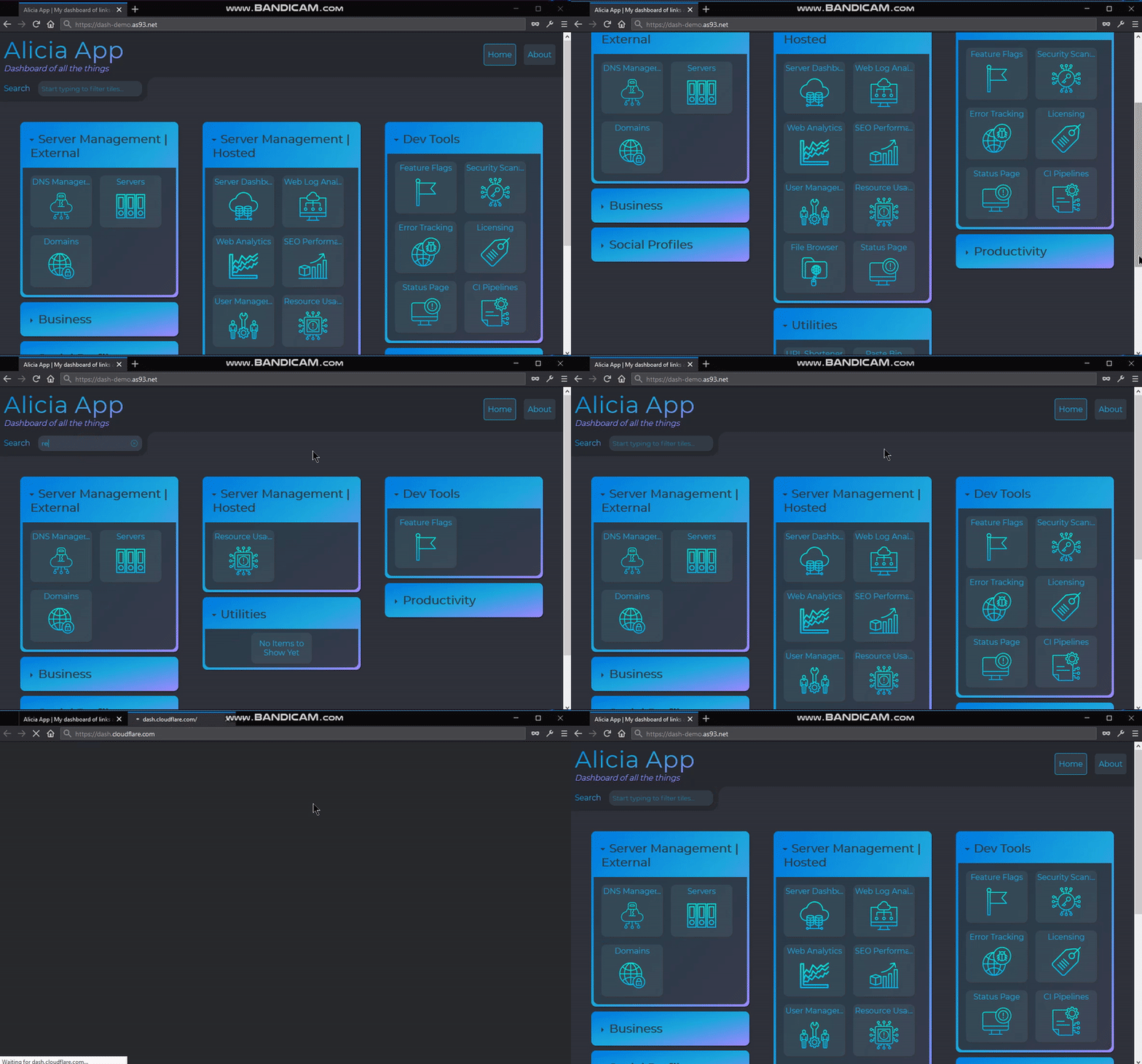
This is a fairly simple app, which (at the moment), it's literally just a glorified list of links (with a slightly questionable color scheme, lol)
|
|
|
|
|
|
|
|
**Demo**: https://dash-demo.as93.net ✨
|
|
|
|
👆 *Here is an example (I've changed the source of the links, stripped personal data, and removed auth so you can see something running)*
|
|
|
|
### Aim 🎯
|
|
|
|
The aim, is for users *(or maybe just me)*, to spend the minimum possible time on on this screen *(aka opposite of what Mark Zuckerberg strives for)*. This is achieved through intuitive keyboard shortcuts, for just about everything, enabling you to navigate to the link you need, asap:
|
|
|
|
- ⚡ Just start typing, and the search-field will auto-focus and items are filtered instantly
|
|
- ⚡ Press tab, tab tab to navigate through filtered results, then hit enter to launch it
|
|
- ⚡ Use Esc at anytime to clear the filter field and show everything
|
|
- ⚡ Collapse/ hide sections that you use less often, and it'll be remembered in session storage
|
|
|
|
### Err, why? 🤨
|
|
|
|
I made this because whenever I open a new tab, there's usually only 1 of a few sites I want to visit, and it annoys me that they either have to be buried deep into the bookmarks, or displayed in an illogical order on my new-tab page. The problem is made worse, as I usually use privacy browsers which don't store any of my settings or history. Also I hate using the mouse, it's not cool.
|
|
|
|
So it's true that I did make it just for my own use. And I've not spent a lot of time on it. - But still all the code is nice and neat, tested and documented- and I'm publishing it here, in case it (or any components of it), could be any use to anybody else :innocent::octocat:
|
|
|
|
---
|
|
|
|
## Road map 🛣️
|
|
|
|
I have a vague idea of what I want to build, what I will use it for, and how I can make it easy and reusable for anyone else who'd like to use it.
|
|
|
|
### V1 - List of Links | (Done) ✅
|
|
|
|
- There should be a Vue app, that reads data from a JSON source and displays a categorized list of links
|
|
- Tiles (aka links) should display text, have a URL location, and optionally show a nice icon
|
|
- Tiles should have an optional tooltip to show essential info. And where titles are long, they should be shown in full, on hover
|
|
- Categories/ sections should be collapsable, and this should be persisted in session storage
|
|
- It should be possible, seamless and intuitive to filter, navigate and launch tiles with just the keyboard
|
|
- The code must be nice, (lint, test, comment/ document and generally follow some kind if standard)
|
|
|
|
### V2 - Additional features | 🔜
|
|
|
|
- Data should be stored in an external, encrypted cloud service and security needs to be top priority
|
|
- UI improvements, and theme switching (light, dark, gradient and material)
|
|
- Widgets, with persistent memory:Notes, todo, link paster, weather, agender, news and notifications etc
|
|
|
|
### V3 - Functionality to do everything through the UI | 💤
|
|
|
|
- Ability to add, edit, reorder and delete both tiles and sections, from the UI
|
|
- Tile data for users encrypted and stored, read/ write on server, then decrypted on client-side
|
|
- Harden security further, try and hack it, then make it even safer
|
|
- Host a public version, with a user management system. Allowing users to register/ login then create and manage their own version.
|
|
|
|
---
|
|
|
|
## Developing 🧱
|
|
|
|
The project is structured in a fairly standard way, so to get started just git clone, cd into it, yarn install the dependencies (or npm, if your that way inclined- no judging here). Then use the following scripts to do what you need to:
|
|
|
|
- `yarn run dev` - Starts dev server, with hot-reload, and diff-linting
|
|
- `yarn run build` - Compiles and minifies for production
|
|
- `yarn run start` - Will serve up the **built** production app from the `dist` dir
|
|
- `yarn run lint` - Lints and fixes files
|
|
- `yarn run test` - Runs all tests
|
|
|
|
You can then add the data for links in JSON (following the format in the example file [item-data.json](https://github.com/Lissy93/alicia-app/blob/master/src/data/item-data.json)), and host it wherever works for you. Don't forget to secure requests to resources, and password-protect the running app if you host it online 🔒
|
|
|
|
---
|
|
|
|
## License 📜
|
|
|
|
This is open source (hence your looking at it here on GitHub :eyes::octocat:). If you want to use it, follow the setup instructions above.
|
|
|
|
Licensed under [WTFPL](https://en.wikipedia.org/wiki/WTFPL), so you can do whatever with it, I'm really not too bothered 🥱 (I mean I don't think I really have to worry about you selling it for millions, since it's probably not even worth a fiver). See below for full license:
|
|
|
|
```
|
|
DO WHAT THE FUCK YOU WANT TO PUBLIC LICENSE
|
|
Copyright (C) 2019 Alicia Sykes : https://aliciasykes.com
|
|
|
|
Everyone is permitted to copy and distribute verbatim or modified copies of this
|
|
license document, and changing it is allowed as long as the name is changed.
|
|
|
|
DO WHAT THE FUCK YOU WANT TO PUBLIC LICENSE
|
|
TERMS AND CONDITIONS FOR COPYING, DISTRIBUTION AND MODIFICATION
|
|
|
|
0. You just DO WHAT THE FUCK YOU WANT TO.
|
|
```
|
|
|
|
If you also just build stuff for fun, and don't mind what anyone does with your code, check the license out: http://www.wtfpl.net/about/
|
|
|
|
---
|
|
|
|
Side note: ok, I know the styling is kind of ugly, but go easy on me, I was drunk when I coded this thing 🥴 And I haven't over-used gradients like this since 2015, when they were last cool :trollface:
|